

Why Google Flights Is a Game-Changer

I still remember the first time Google Flights fetched a deal instantly, while another site took forever to load. That speed made a lasting impression—and it’s only one reason I keep coming back. Google Flights stands out because it delivers lightning-fast results, lets you see fare changes at a glance, and pulls in a huge selection of airlines and routes all in one place. The transparency around prices and flight options is hard to beat, especially when you’re trying to avoid the usual booking headaches.
This article is all about going beyond basic searches. I’ll walk you through expert-level strategies to help you find the lowest fares, avoid common booking pitfalls, and get more out of every search. We’ll cover advanced filters, flexible date tricks, and how to spot the best hidden deals. If you want to sidestep extra costs, I also recommend checking out this in-depth post on latinofare.com about avoiding hidden airline fees.
Comparing Google Flights To Other Tools
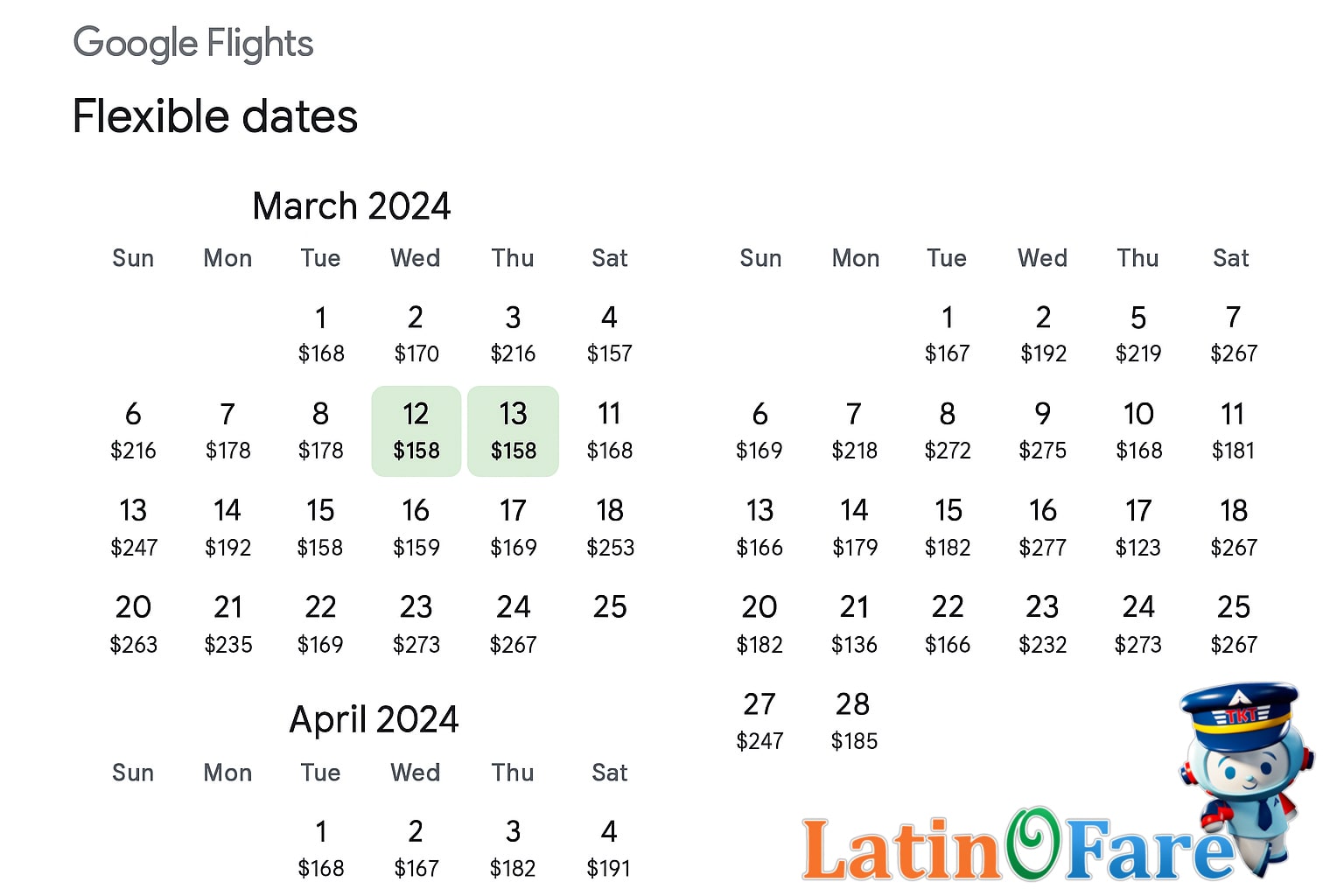
Google Flights is one of the most popular platforms for searching airfare, but it’s not the only game in town. Alongside it, sites like Expedia, Kayak, Skyscanner, and OTAs such as latinofare.com offer their own strengths. Some travelers even prefer searching directly on airline websites for special promotions or loyalty perks. Each tool approaches flight data a little differently, so it’s worth knowing how they compare.
Feature Comparison Highlights
Google Flights stands out for its lightning-fast real-time pricing and the visual date grid, which makes spotting the cheapest days a breeze. I find the fare transparency especially helpful—Google shows you exactly how your fare is built, including baggage fees and flexible ticket options. However, some OTAs occasionally display lower prices by tapping into special deals or “private fares” not shown on Google. For example, one time, I found a discount on Google Flights that wasn’t on my usual favorite site, but I’ve also seen the reverse—a flash deal on an OTA that didn’t appear on Google at all.
Industry studies, like those published by The Points Guy and NerdWallet, often note that no single search engine consistently finds the lowest price every time. That’s why I always recommend blending platforms. By cross-checking Google Flights with sites like latinofare.com or comparing fare platforms using guides like this practical booking strategy article, you give yourself the best shot at finding hidden deals or exclusive promos.
Flexible Date and Destination Searches
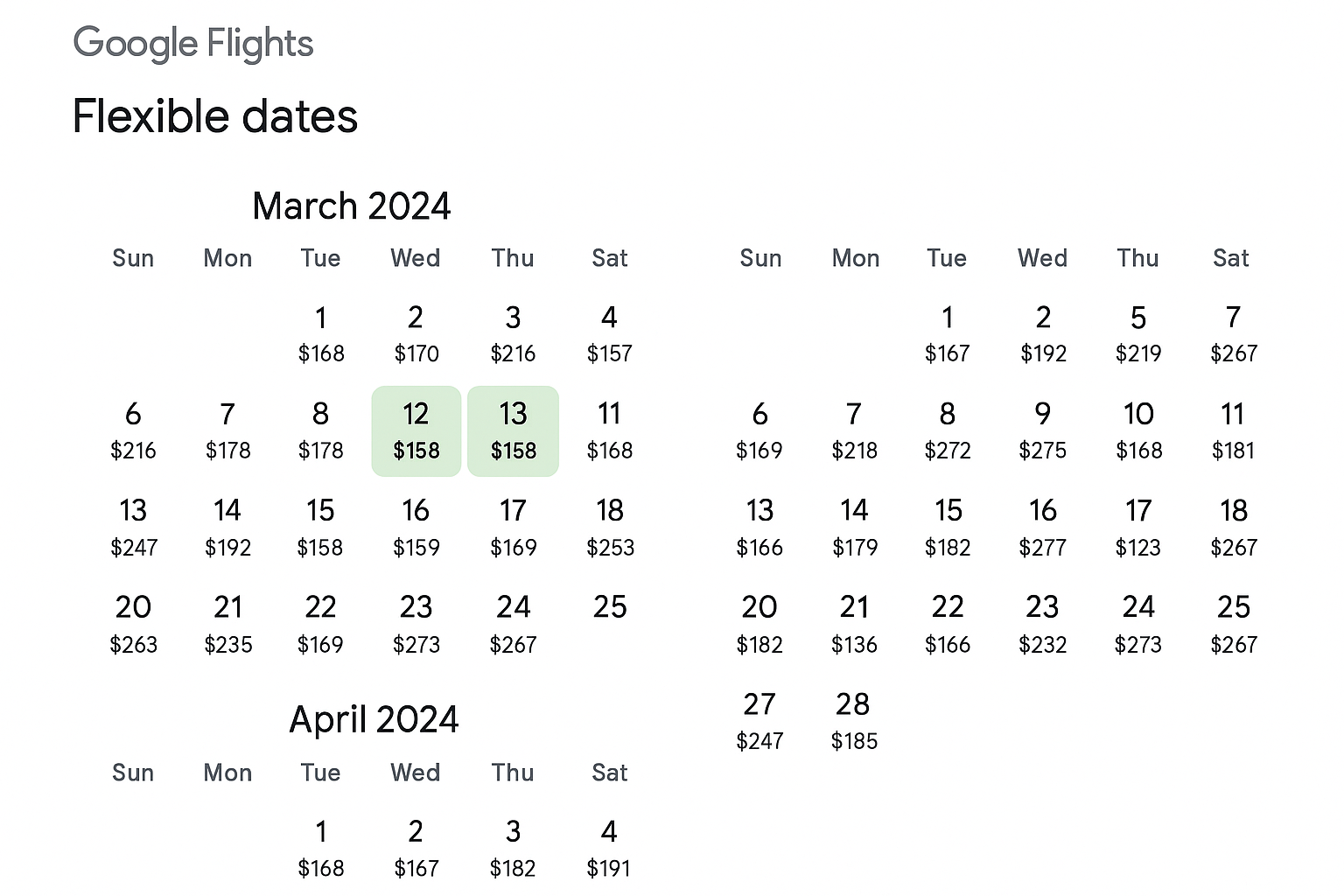
Getting the best airfare often comes down to how flexible you are with your travel dates and airports. On Google Flights, I usually start by entering my origin and destination, but instead of fixed dates, I click the calendar icon to see the full grid of prices by day. This calendar view makes it easy to spot the cheapest weeks—sometimes shifting by even a single day can mean saving $80.00 or more, which I’ve experienced myself when I moved my departure to a Tuesday instead of a Monday.
If you’re open to exploring, try searching “anywhere” as your destination or add nearby airports in both your departure and arrival fields. Google Flights will display a map and list of alternate airports, so you can compare fares at a glance. I’d recommend checking the “flexible dates” or “whole month” option, which highlights the lowest fares for each day and can reveal off-peak periods you might not have considered. For advanced savings, consider open-jaw bookings—flying into one city and out of another—which can be set up by selecting the “multi-city” tab. This is especially useful for longer trips or multi-country itineraries.
For even more customizable planning, I’d compare your Google Flights findings with the flexible search tool at latinofare.com, which lets you mix and match dates and airports for extra savings.
Mastering Price Tracking and Alerts

If you want to catch the lowest airfare, learning how to set up price tracking in Google Flights is a must. Start by searching your preferred route and dates, then toggle on “Track prices.” You’ll get email alerts whenever the fare changes. I once received an alert for a New York to Mexico City flight that dropped by about $120.00 overnight—I booked immediately and never saw it that low again.
When you get a Google Flights alert, act quickly. These deals can disappear fast, especially on popular routes. The email will show the current fare, sometimes with a chart of recent price trends. I recommend tracking several similar routes or nearby airports. The more options you follow, the better your chances of catching a fare dip.
For even more deal coverage, you can also sign up for the fare alert newsletter from latinofare.com. Their team highlights additional tips and low-fare opportunities that might not appear in Google Flights.
How To Use Explore Map Creatively

Google Flights’ Explore Map is my favorite tool when I’m itching for a spontaneous getaway or just want to see where my budget could take me. To get started, go to the “Explore” tab on Google Flights. Enter your departure city and leave the destination blank, then set your dates or select flexible options. The map will instantly fill with prices for cities all over the world.
You can drag the map, zoom in on a specific region, or zoom out to see broader deals. I once zoomed out from my home airport and spotted a surprisingly cheap flight to Guatemala—somewhere I hadn’t even considered until that moment. This approach is ideal for last-minute trips or when you’re open to new destinations but want to keep costs low.
Comparing prices by region also helps spot clusters of affordable options. If you want more inspiration, I recommend checking out the destination ideas on the latinofare.com blog, or for more technical tips, see the Google Flights Explore help page.
Hidden Features and Advanced Filters
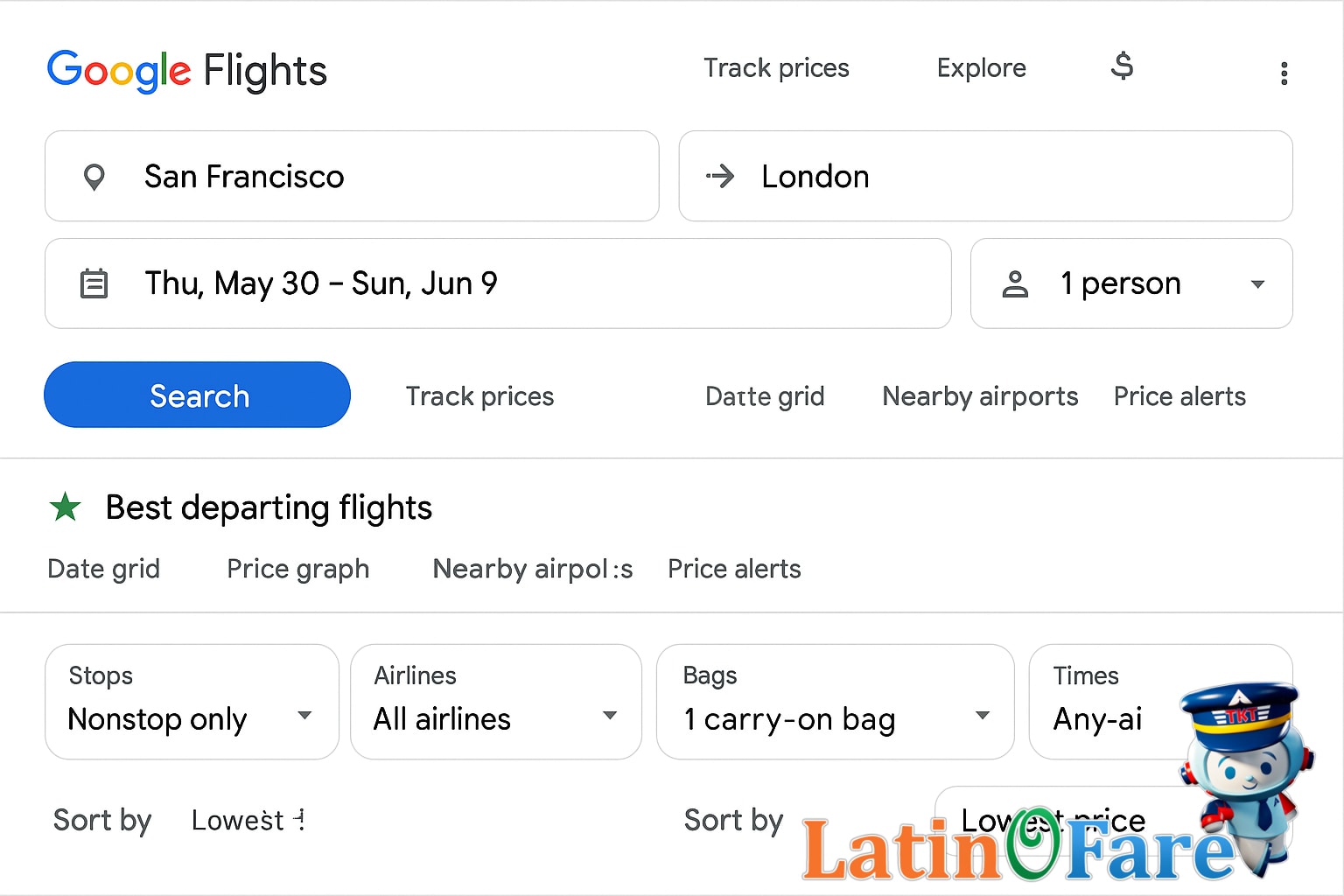
If you really want to get the most out of Google Flights, it pays to dig into some of its lesser-known features. You’ll find options like length-of-stay toggles (great for seeing how trip duration changes prices), direct vs. layover filters, baggage and cabin class selectors, and even the ability to save your favorite airlines into a shortlist for quick comparisons. These tools can make a big difference when you’re chasing the absolute best deal.
One feature I use all the time is the “carry-on only” filter. It’s a real time-saver because it instantly weeds out fares that look cheap but hit you with bag fees at checkout. If you’re a visual planner, you can also use the “draw on map” tool to highlight a custom search region—helpful if you’re open to multiple airports or flexible destinations. And for anyone who hates surprise fees, toggling baggage filters ensures you see the real bottom-line fare, not just the headline price.
I usually recommend filtering for carry-on-only fares right away. It saves me from clicking through pages of seemingly low fares that balloon with extra charges. For more tips on avoiding baggage fees, check out latinofare.com’s detailed guide to airline baggage costs. If you want to explore every advanced filter, Google’s own support guide is worth a look.
Booking Tips and Key Caveats

Booking a flight online is more than just picking the lowest price. I’ve learned the hard way that a quick click can lead to surprise fees or awkward seat assignments. Here’s my checklist for a safer booking process:
- Double-check the flight number, dates, and passenger details before confirming.
- Review refund, change, and cancellation policies—especially for basic economy fares.
- Check baggage rules, as airlines often update what’s included in the fare.
- If you’re redirected to a partner airline (codeshare), confirm seat selection and baggage on the operating carrier’s website.
Codeshares can be confusing. One time, I booked a cheap flight that looked great, but didn’t realize it was operated by a different airline. I couldn’t select a seat until check-in, and my carry-on wasn’t included. Since then, I always look up the operating airline’s policies before finalizing payment. It’s worth the extra minute to avoid last-minute surprises.
Airfare Budget Comparison Table
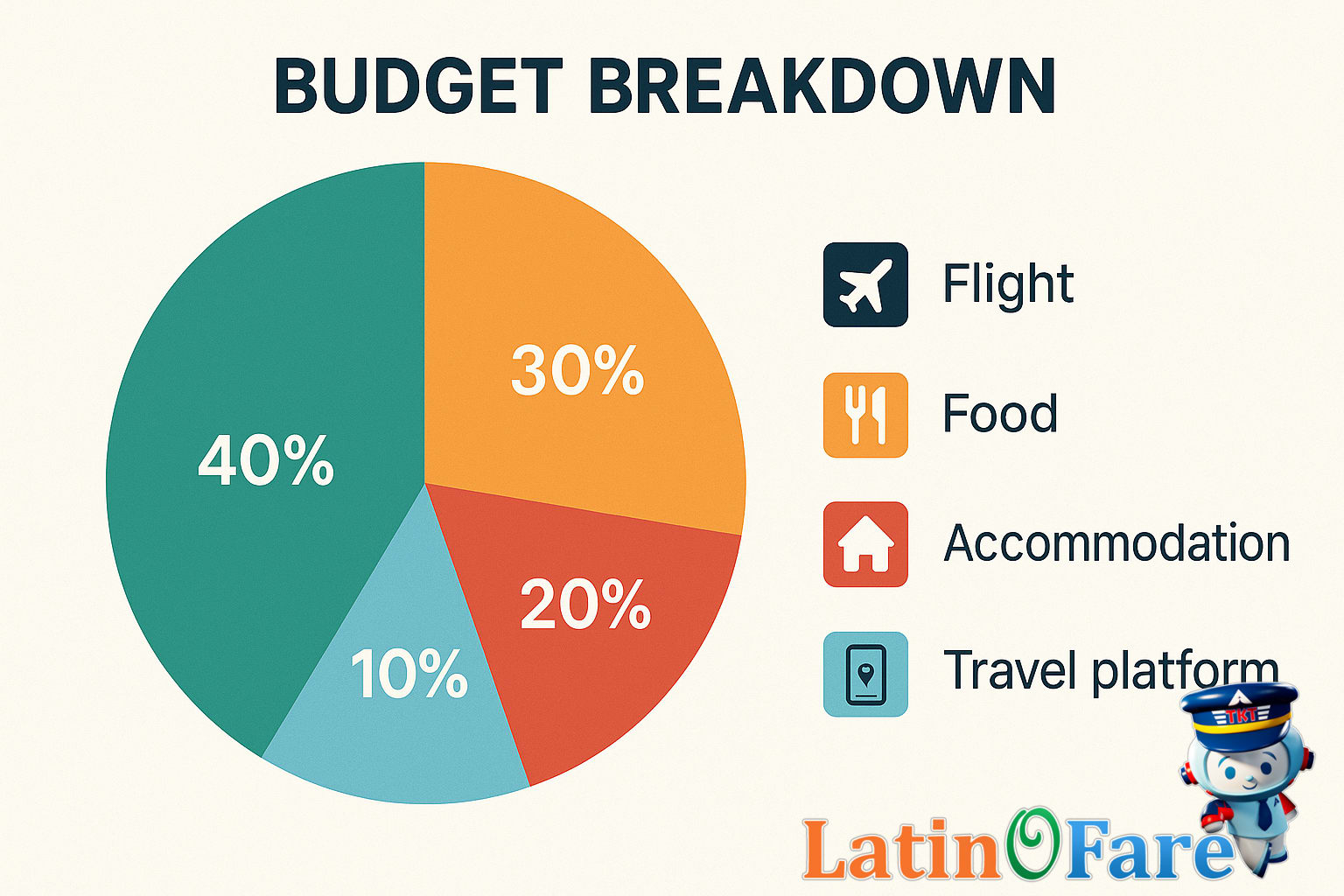
It’s always eye-opening to see how flight savings can shift your entire travel budget. I once scored a cheaper ticket using Google Flights and used the extra cash for a last-minute snorkeling tour—definitely worth it. Here’s a sample budget table showing how your choices in each category can impact the overall trip experience, especially when airfare costs are kept low.
| Budget | Mid-range | Luxury | |
|---|---|---|---|
| Accommodation | $35.00 | $110.00 | $320.00 |
| Food | $15.00 | $45.00 | $120.00 |
| Transport | $10.00 | $35.00 | $85.00 |
| Activities | $20.00 | $60.00 | $180.00 |
As you can see, even a small reduction in airfare can free up enough for a special meal or a memorable excursion. When planning with a strict budget, I always look at how flight deals from latinofare.com can help me stretch my funds further on the ground.
Google Flights Cheap Flight FAQs

- How does Google Flights find cheap flights?
Google Flights pulls data from a wide range of airlines and travel partners, showing fares in real time. It doesn’t sell tickets directly but helps you compare options quickly. I’ve found it useful for spotting price drops and flexible date combinations, especially when planning trips with shifting schedules or open destinations.
- Can I book directly on Google Flights?
No, Google Flights doesn’t handle bookings. Once you choose a flight, you’re redirected to the airline or travel agency’s website to complete your purchase. For extra support or bundled travel services, I’d also recommend checking options on latinofare.com before you book.
- Do I need a Google account to use Google Flights?
You don’t need a Google account just to search for flights or compare fares. However, if you want to track prices, save itineraries, or receive fare alerts, you’ll need to sign in. This makes it easier to monitor deals and receive notifications about price changes.
- Why do Google Flights prices sometimes change suddenly?
Flight prices on Google Flights can shift quickly because fares are updated in real time by airlines and travel agencies. If you see a good deal, it’s smart to act promptly. I’ve missed out on lower fares before by waiting too long, so timing really matters.
- Is Google Flights always the cheapest way to book?
While Google Flights shows many low fares, it doesn’t always display every deal or promo available. Sometimes, exclusive discounts or bundled offers appear on other platforms like latinofare.com. It’s worth comparing before booking, especially if you want personalized customer support or package deals.
- Who can help if I have booking issues after using Google Flights?
If you book through an airline or travel site after searching on Google Flights, you’ll need to contact that company for support. For travelers who want ongoing help, latinofare.com offers customer service before and after booking, which can be reassuring if plans change or issues come up.
Conclusion and Savvy Search Recap
After years of booking flights, I can honestly say that using Google Flights’ advanced strategies has made me a far more confident—and budget-savvy—traveler. Comparing prices, playing with flexible dates, and using those filtering tricks really put the control back in your hands. It’s empowering to see just how much you can save with a bit of patience and curiosity.
Remember, the best deals often reveal themselves to travelers who check back over several days and use every tool available. If you ever want more personalized help or a second set of eyes on your airfare search, latinofare.com is always there with extra support and exclusive deals.